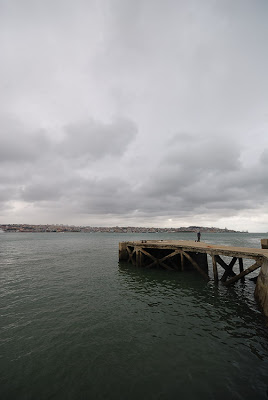
Equipment / Technical Info Nikon D80 Sigma 10-20mm F4-5.6 EX DC
Shutter Speed: 1/100 second F/8.0 10 mm 100
Original Photo
Post Processing This photo was one of my first choices. Later back home I regret that I didn't took the tripod and the 10 stop filter, it was the ideal shot. So I imported the photo into Lightroom and started playing around with the filters. Honestly, I didn't know how to process this one. My first reaction was: let's convert it to B&W. But I didn't liked the result so I started messing around with the settings to get something out of it. So, I started by adding a Gradient Filter to the sky to darken it a bit. Then, I increased the Vibrance, the Fill Light, the Contrast and the Exposure. Next step was the White Balance. I wanted to get a more warm feeling, but not too warm because the pier itself was becoming too orange and the river too green. So I reduced the Saturation on the Oranges and on the Greens to compensate the WB adjustment. That was it for Lightroom. Let me stress that I was completely playing around with the settings, not knowing where I was going to. I was just looking for something that would catch my attention. In CS4 I've done: Auto Tone, Auto Contrast, Auto Color and Auto Levels, then reduced the Vibrance and applied the "Tobacco Grad (125)" action to the sky (you can find this and other actions to simulate the effect of Gradient filters here: http://www.thelightsrightstudio.com). This gave me the full size (10Mp) final image. I usually publish my photos with 1024px in the largest size and use a great Photoshop action by Manyk to do the re-size. You can find it here: http://manyk.deviantart.com/art/Web-Sharpening-with-Photoshop-29038461 I was not quite satisfied with the final result: it was a bit too unreal for what I was looking for. But after some time it started to grab my attention so I decided to publish it.
Equipment / Technical Info Nikon D80 AF-S NIKKOR 18-70mm 1:3.5-4.5G ED
1/50 second F/8.0 40 mm 100
Original Photo
Post Processing This photo rested in my hard drive almost one year until I decided to give it a shot. It was December, Christmas has passed and the weather was very rainy. On top of that, my wife was pregnant and my photo trips had been reduced to the minimum for us to be together more time. I already had published two photos of Meteora and in both I almost didn't touched them in post processing. This time I decided to give it a different atmosphere. Has I had noticed in other photos (like Bridge To Neverland) when they are shot under foggy conditions, the Contrast is very low. This was one of the first things to address. The second thing were the colors: they were very dull, so I decided to bring them up. In Lightroom I've increased the Blacks, the Vibrance and the Sharpening, then I increased the Saturation on the Greens, Yellows, Oranges, Reds and Blues. Next I increased the Luminance on the Greens, Yellows, Oranges and Reds, and reduced it on the Blues and Aquas (to darken the sky). Next, another boost to the Contrast, Vignetting was added, increased the Clarity and the Saturation. Then I started playing around with Split Toning, with the objective of warming the colors a little: in the Highlights I increased the Hue to 40 and the Saturation to 20. Finally, I increased 0,75 stops on the Exposure and added a Gradient Filter to darken the sky. In CS4, I've started by applying the Virtual Photographer plug-in (you can find it here: http://www.optikvervelabs.com) with the setting "Fall Colors" and then applied the "Tobacco Grad (125)" action to the sky (you can find this and other actions to simulate the effect of Gradient filters here: http://www.thelightsrightstudio.com). Then I adjusted the Levels and the Color Balance, increased the Brightness and Contrast and re-touched the Levels again ("Increase Contrast 1" preset). I usually publish my photos with 1024px in the largest size and use a great Photoshop action by Manyk to do the re-size. You can find it here: http://manyk.deviantart.com/art/Web-Sharpening-with-Photoshop-29038461
Post Processing This photo walk gave me some good photos and this particular photo was in the lower half of that list. It had almost every reason to get rejected: it was too dark and it was to noisy from the low light and high ISO. I really don't like photos with low detail, I prefer when I look at a photo a can see all the details on it. But this photo was the best one from the ones that had lines and the BUS word on it (I took some others in Rossio). I decided to give it a shot anyway, if it was a bad call I would loose €1. Let me explain this €1 stuff... Since I entered the digital photography world that I stopped printing photos. With the exception of some vacations photos that my wife would print, I never had printed some of my photos before. One day, after buying the Nikon D80 (I had a Sony DSC-V3 compact camera before), I decided to print some of the Nikon photos because we were preparing to go on holidays and I didn't wanted to have any bad surprise afterward. So I selected a few photos and had them printed in several formats. One of the formats was Mate 20x30 (cm). I was amazed with the result. From that point on, I decided that I would print on that format all the photos that I would publish. Each print costs about €1 :) This way I could feel the photos in my hands and also would make me (at least most of the times) be more selective of what I publish. Well, back to post processing, I imported the file into Lightroom and first of all I cropped it to my like. Then I increased the Exposure, the Blacks and the Contrast. The sky was still a bit electric blue so I reduced the Saturation and the Luminance of the Blues to the minimum. It was still with low contrast so I started to try some presets. I ended up choosing "Matt's Sin City - Light Red" preset (you can get it here: http://www.lightroomkillertips.com/2008/presets-sin-city-look-sort-of/). That was it for Lightroom, so I moved on to CS3 and there I've: converted to Black & White (Red Filter preset) and done some Auto Tone, Auto Contrast and Auto Color. I usually publish my photos with 1024px in the largest size and use a great Photoshop action by Manyk to do the re-size. You can find it here: http://manyk.deviantart.com/art/Web-Sharpening-with-Photoshop-29038461
Equipment / Technical Info Nikon D80 AF-S NIKKOR 18-70mm 1:3.5-4.5G ED
1/250 second F/3.5 18 mm 100
Original Photo
Post Processing This photo rested over 20 months in my hard drive, waiting for it's turn. Well, Christmas day, 2009 was the day. I had imported this photo into my Lightroom catalog a few days after our arrival from NY, back in 2008. I had tried almost all of my presets in this one, but never got quite satisfied with the result. In this day, I decided to let the presets aside and do it manually from scratch. First I straighten it and applied the proper crop. Then I increased the Sharpening and reduced 1 stop to the Exposure to darken the sky a bit. This left the photo too dark and brought me to the next step: increase the Fill Light. Then I increased the Blacks, the Clarity and the Contrast; reduced the Exposure another stop and increased the Brightness to compensate. To darken the sky even more, I reduced the Luminance of the Blues to the minimum. Now it was ready for the Black & White conversion. I prefer to do this step in CS4, so I imported the photo there. In CS4, I've done Auto Levels, Auto Contrast and Auto Colors, and converted to Black & White (Infrared preset). I then added some Vignetting, increased the Contrast and the Brightness and had some noise reduction (the clouds part was a bit noisy). And that was it. I usually publish my photos with 1024px in the largest size and use a great Photoshop action by Manyk to do the re-size. You can find it here: http://manyk.deviantart.com/art/Web-Sharpening-with-Photoshop-29038461
The Story January, 2009. My sister was at the time working in Athens and invited us to go there for a week (check the Meteora II photo story for more details)... After spending a couple days sightseeing the historical places in Athens, we decided (as advised by our guide, i.e, my sister) to check the Olympic Complex. The Olympic Complex was built for the 2004 Summer Olympic Games, held in Athens, the birthplace of the Olympic Games. The weather was kinda cloudy, almost rainy, but we decided to go anyway. After all, there isn't as much places to see in Athens as I thought. We picked the subway and when we got there, the first thing that captured my attention was the metallic structures. The main entrance of the Olympic Complex has a big metal structure with fountains around it. We started our visit there. I picked the camera and tried several perspectives with the fountains and the metal structure. After a few shots, I noticed that the sun was setting in behind one of the pavilions. The sun, the clouds, the water mirror, the trees and the pavilion combined into this picture. I also find the line formed by the lake shore, combined with the lines of the pavilion, quite interesting.
Equipment / Technical Info Nikon D80 Sigma 10-20mm F4-5.6 EX DC
1/125 second F/5.6 20 mm 100
Original Photo
Post Processing I liked this photo almost as it came out of the camera. A few things were to be corrected, though: the colors were a bit dull and the sky was burn (white, without any color information). I imported it into Lightroom and applied the Highlight Recovery to the maximum. I then, increased the Contrast and the Vibrance, added some Vignetting and reduced the Luminance for the Oranges, Yellows and Reds. In CS4, I've just increased the Contrast a bit more. That was it. I should have been more careful in the location and prevented the sky from being burned out. Somethings can't really be recovered in post processing and this is one of them (tip: always expose the photo to prevent the highlights burn out. It's easier to recover the shadows than the highlights). I usually publish my photos with 1024px in the largest size and use a great Photoshop action by Manyk to do the re-size. You can find it here: http://manyk.deviantart.com/art/Web-Sharpening-with-Photoshop-29038461
The Story April, 2009. My wife's parents came to visit us and after lunch we took them for a walk in downtown Lisboa (check Rossio photo story for more details). When we got there, I left them doing some sightseeing and got right to business. I mounted the camera on the tripod and started exploring potential angles. I started with the Restauradores square but the angles weren't quite as I wanted. Then I moved to Rossio square and hanged there for a while. My objective was to capture the cloud movement and "erase" the people from the street. So, I took a couple shots (they require some time of preparing) and moved on to another spot: Rua Augusta. Rua Augusta is the main street of downtown Lisboa. It goes from Rossio to Praça do Comércio, near the Tagus river. It's a pedestrian street that's packed with some of the most fine shops (or at least it used to be) and a lot of restaurants. In the Comércio side of the street, it ends up in a triumphal arch. This spot, near the arch, was the place where I imagined the photo. From a lower perspective, capturing the arch, the clouds passing above it, the fuss in the street. It seamed a good composition. So I done the math (to calculate the exposure) and prepared the shot. I only took one shot here because there was a lot of people there and I was in their way. Anyway, I already had what I wanted. And that was it for the day. Time now to find my wife and her parents, somewhere in Lisboa downtown.
Equipment / Technical Info Nikon D80 Sigma 10-20mm F4-5.6 EX DC Hitech 85 ND 3.0 filter Slik Pro 340DX tripod
30/1 second F/16.0 12 mm 100
Original Photo
Post Processing This photo was the second one that I published from this day. It got published two days after it was taken. When I reviewed it in the computer I noticed three things: it was with the colors all messed up (as all the others from this day); it was dirty from the light that passed the filter holder (as the others) and it was very dark. As happened with Rossio photo, I had two alternatives: Black & White or try to fix the colors. I've already turned the other into B&W and this one was too dark for it anyway, so the only option was trying to correct the colors. So I imported the file into Lightroom and started with an Auto Tone, followed with a White Balance correction to make it warmer. Then I started adjusting the Hue of the Blues and Yellows. I was starting to despair... there was something missing. I started playing around with presets and I ended up using the "COL Nikonians - Mode Illa" (you can find it here: http://www.presetsheaven.com/2008/08/30/deviant-presets-for-lightroom-ii-turns-the-light-on) preset. That kinda put me back on tracks and so I moved on: adjusted the Hue of Oranges and started removing the flare spots in the bottom left of the photo. The latest was the harder step, if I had covered properly the filter holder (instead of using the camera strap for it) nothing of this would have been necessary. Finally I increased the Blue Saturation and decreased the Luminance. In CS4, I've done: Auto Tone, Auto Contrast, Auto Color and Auto Levels. Then I just added some Vignetting. This gave me the full size (10Mp) final image. I usually publish my photos with 1024px in the largest size and use a great Photoshop action by Manyk to do the re-size. You can find it here: http://manyk.deviantart.com/art/Web-Sharpening-with-Photoshop-29038461
Post Processing Back home, this photo wasn't, surprise, surprise, one of my first choices :) Only almost one week after, I decided to give this photo a chance. My first thought was to find a way to darken the clouds and give it a more dramatic look. I imported it into Lightroom and adjusted the perspective with a proper Crop. I've added a Graduated Filter to darken the sky and lighten the river. Then, I've increased the Exposure, the Contrast, the Fill Light, the Clarity and the Sharpening. I wasn't fully satisfied so I started playing around with the presets. I ended up choosing the "Civil War 2" preset by Vidular (you can find it here: http://www.flickr.com/photos/vidular/2456010834/). After the preset, I've lightened the pier base with a brush so that it would show more detail. In CS4, I've done: Auto Tone, Auto Contrast, Auto Color and Auto Levels. Then I converted to Black and White (Green Filter preset) and increased the Vignetting to the maximum. Finally, I've warmed the photo a little with the "Warm (26)" action from TLR (you can find this and other actions to simulate the effect of Gradient filters here: http://www.thelightsrightstudio.com). This gave me the full size (10Mp) final image. I usually publish my photos with 1024px in the largest size and use a great Photoshop action by Manyk to do the re-size. You can find it here: http://manyk.deviantart.com/art/Web-Sharpening-with-Photoshop-29038461
Post Processing When I reviewed the few photos taken this day, I came to a conclusion: almost all of them were rubbish. They were too dirty. Even this one, if you look at it, it's badly exposed and has lots of flare from the light that come from the filter holder holes. Also the colors are quite strange, with the Magentas very high. The latest is a characteristic of this filters: don't care too much with the White Balance or the colors when you are taking the shot. They will never be closer to the real ones. So, I had two alternatives: I could try to fix the colors or I would convert the photo to Black & White. Usually the later is the preferred for it's simplicity. In this photo I went that path. I imported the NEF into Lightroom and started by removing some dust spots (they were more visible because I used a very small aperture) and then increased the Highlight Recovery and the Contrast. Then I applied the "Matt's 300 Look - Strong" preset (you can find it here: http://www.lightroomkillertips.com/2008/monday-presets-the-300-look) and converted the resulting image to Grayscale. Finally I've increased the Contrast a bit more and moved on to CS4. In CS4, I've done: Auto Tone, Auto Contrast, Auto Color and Auto Levels. Then I converted to Black and White (Red Filter preset) and increased the Contrast again. This gave me the full size (10Mp) final image. I usually publish my photos with 1024px in the largest size and use a great Photoshop action by Manyk to do the re-size. You can find it here: http://manyk.deviantart.com/art/Web-Sharpening-with-Photoshop-29038461 I'm not that happy with result to be honest, but for some reason (probably the impact of it) this photo is very popular among my viewers.
In this blog I will tell you a story about my photos. Where were they taken, why did I took them and what have I done with them between the camera and the web. This is not a Photoshop training blog, nor a photography tips blog. This is just a place where I share with you all that makes some photo look like it looks.
About me My name is João Pedro Neves, I am from Lisboa, Portugal and I was born in 1975. I am a professional software developer and enthusiastic photographer. I currently own a Nikon D80 and 4 lenses: Sigma 10-20, Nikkor 18-70, Nikkor 50 1.8D, Nikkor 70-300VR.